
Software · Mechanical engineering · Maintenance
DiGiTAL TWiN SEARCH is live in a fundamentally new version. Our browser-based software recognizes unknown components in a photo and matches them against your company’s STEP and IGES data. The goal is as practical as it was in 2019: to significantly reduce search times in maintenance, production and warehousing. What is new is how we get there.
You upload your existing CAD library. An employee photographs the part on the workbench and receives matching results from your own inventory, including part number, storage location and three-dimensional model. No app needs to be installed. The application runs in the browser on smartphones, tablets and desktops and is currently being tested under real-world conditions.
- First approach
- 2019
- Views per part
- 48
- Comparison images
- 144
- Search time
- about 1.2 seconds
The idea came from a real problem
The starting point was in 2019. At a congress, Dr. Andreas Groß of the Berger Gruppe in Wuppertal approached our managing director Werner Koch about an everyday and costly problem in mechanical engineering: components are lying in production, goods receiving or maintenance but can no longer be reliably assigned to an order or a part number.
“We lose person-years searching.” Dr. Andreas Groß, Berger Gruppe, on the starting situation of the project
This conversation led to the first DiGiTAL TWiN SEARCH. We developed our own method for it, because the usual approaches to image recognition were not sufficient for technical components of any shape. Unlike faces or plants, machine parts do not share a common set of easily comparable features. Angles, holes, contours, dirt, shadows and changing lighting make the task considerably more difficult.
Our developer Rainer Martin described exactly this technical limit at the time: for this specific use case, there was no directly suitable solution either on the market or in research. We therefore had to combine shape analysis, measurement and comparison with the customer’s CAD data in a method of our own.
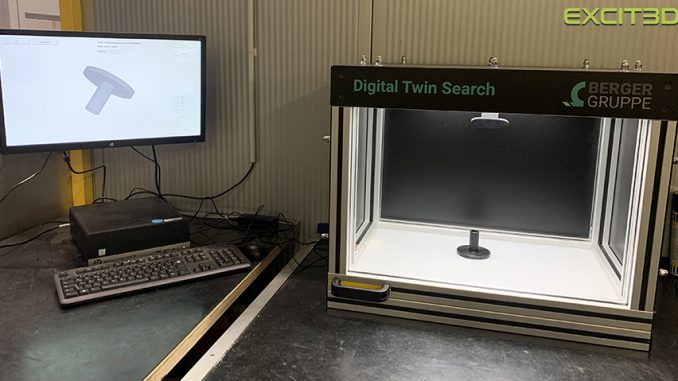
From a custom solution to a completely rebuilt product
Our early version worked with physical markers on the components and measured the objects via a tablet camera or a stationary webcam. At the Berger Gruppe, we also used a box with indirect lighting so that changing light conditions would affect recognition less. The 3D model found could be displayed together with product information and, if desired, placed next to the real component as an augmented reality object.
The method solved the specific use case but was tied to prepared parts and defined recording conditions. This is exactly the limitation we have removed in the new version.
We reported on the first operational solution on December 11, 2019, followed by our video presentation of the component recognition in February 2020. After that the topic rested until image models and vector databases made a second, much broader attempt possible.
What the new TwinSearch does differently
The key difference is quickly explained: In the past, the real component had to be prepared for recognition. Today your CAD library does most of the preparatory work. The physical marker is no longer a mandatory label. It is only placed next to the part as an option when the actual size should be included in the search in addition to the shape.
How the new version recognizes a component
We deliberately put the compute-intensive work into the import of the CAD data and not into the moment when someone searches in the workshop. This keeps the actual query fast.
Preparing CAD files
We measure your STEP and IGES files, convert them into a triangle mesh and prepare them for image analysis. ZIP collections can be imported in bulk, and metadata such as part number and storage location are added via CSV.
Rendering from 48 directions
We render each component from 42 viewing angles distributed evenly over a sphere and six axis-parallel directions.
Simulating workshop conditions
For each view, we generate two additional, photo-like variants with slight tilting, reflections and image noise. In total, 144 comparison images describe a single component.
Comparing shape vectors
The image model DINOv2-base generates vectors with 768 dimensions. We cut out the workshop photo, place it on a white background and process it in the same way. PostgreSQL with pgvector then searches for the closest matches by cosine similarity.
Optionally including size
An ArUco marker with an edge length of 50 millimeters next to the part provides a scale. We sort out candidates whose dimensions differ by more than twelve percent. Without a marker, the pure shape search remains available.
Why the new approach scales better in everyday use
You do not have to label your parts or maintain them on the shelf. We work with the CAD data that already exists in engineering and documentation. This also makes it possible to search for a part that turns up for the first time in an unplanned place.
At the same time, the technical entry barrier drops: open the browser, take a photo, check the results. There is no app distribution and no limit by workstation. This allows the search to be used from maintenance to the early shift.
- Image model
- DINOv2-base
- Vectors
- 768 dimensions
- Database
- PostgreSQL + pgvector
- Index
- HNSW
- Server
- Frankfurt am Main
Benefits for maintenance and production
With the new TwinSearch, we address companies that manage many similar components whose assignment is not always clear in everyday work. Typical situations arise during maintenance work, in goods receiving, in spare parts warehouses or with leftover stock from completed projects.
The benefit is not just a shorter search. If an existing part is not recognized, this can lead to a wrong order, unnecessary re-production or even scrapping. That is why, as early as the Berger Gruppe project, we combined efficiency and sustainability: existing workpieces can be found again and reused.
We compare an estimated manual search of around 15 minutes with a measured response time of about 1.2 seconds. This value describes the technical search response. Whether the correct match appears first still depends on photo quality, visible geometry and the completeness of your CAD library.
What we deliberately do not promise
A camera can only compare visible features. Two parts that differ only in the depth of a hole or an inner contour may therefore appear together in the list of results. Highly reflective surfaces, backlight and a busy background also make cutting out the part more difficult.
And there is a clear limit: what is not in your library as a STEP or IGES file, we cannot find. Our software does not add unknown components and does not invent part numbers.
Data protection and operation in Germany
We operate the new DiGiTAL TWiN SEARCH on servers in Frankfurt am Main, Germany, and data is stored within the European Union. Each organization works in its own data area and only sees its own inventory. We do not pass your STEP files on to third parties. For larger companies, we also offer operation in their own data center.
Frequently asked questions about the new DiGiTAL TWiN SEARCH
What is DiGiTAL TWiN SEARCH?
DiGiTAL TWiN SEARCH is our browser-based component recognition. We compare the photo of an unknown part with your STEP or IGES library. The results show matching part numbers, storage locations and 3D models.
Do components have to be marked beforehand?
No. Our new version searches by shape without any labeling. A 50-millimeter ArUco marker can optionally be placed next to the part so that we can also take the real dimensions into account.
Which CAD formats are supported?
We support STEP, IGES and ZIP collections up to 200 MB. You can add part numbers, storage locations and other metadata via a CSV file.
Is an app installation necessary?
No. The search runs in the browser on smartphones, tablets and desktops. We do not limit users or searches in our plans.
How can the component recognition be tested?
Send us up to 100 STEP files from your own inventory. We import them and provide you with a free 30-day trial.
A new attempt, the same concrete question
With the new DiGiTAL TWiN SEARCH, we do not start with an abstract technology demonstration but with the same question that Dr. Andreas Groß asked in 2019: how does an employee find a component again whose number nobody has at hand?
Our answer is much more accessible today. Instead of preparing every part, we systematically prepare your existing CAD library once. Instead of a specialized installation, a browser is enough. And instead of evaluating only contours and measurements, we combine rendered CAD views, photo-like variants, visual shape vectors and, if needed, a size check. The idea from 2019 remains. The technical path is new.
Try it with your own components
A demonstration with someone else’s parts says little about your inventory. That is why you can test the new TwinSearch for 30 days with up to 100 of your own STEP files.
More on this topic: Current DiGiTAL TWiN SEARCH, our project report on the Berger Gruppe from December 11, 2019 and our video presentation from February 3, 2020 (in German).
More projects by EXCIT3D
Annual review · 2024 Review 2024 The most successful year in EXCIT3D’s history so far. From the Willy Brandt bust to the virtual Goslar Cathedral: all projects of the year. Annual review · EXCIT3D GmbH, Solingen 2024 was by far…
Weiterlesen →AI · Virtual reality · Construction AI Studio Munich · 2024 AI on the construction site, experienced in VR. A VR demonstrator on construction site logistics, developed with Fraunhofer IAO. The Construction Pioneer · EXCIT3D GmbH, Solingen · © EXCIT3D…
Weiterlesen →Virtual reality · 360° · Education for sustainable development Nicaragua · Honduras · Solingen · 2024 Climate protection projects from Central America in 360° and VR. Young people from Nicaragua and Honduras show in 360° films how they reforest mangroves…
Weiterlesen →About EXCIT3D GmbH
We develop applications where 3D technology, augmented reality, virtual reality and software development meet. For industry, culture and public clients we build solutions from the first idea through 3D data processing and user interface to live operation. We are based in Solingen, Germany.